Web App Inference Flow
Overview
This document describes how machine learning inference works in the VIPR Web Application, covering the complete flow from user interaction in the frontend through backend processing to core execution.
Architecture Overview
VIPR Web Application uses a 3-tier architecture with asynchronous background processing:
┌─────────────────────────────────────────────────────┐
│  Tier 1: Presentation Layer                         │
│  Frontend (Nuxt.js/Vue)                             │
│  - Configuration UI                                 │
│  - Pinia State Management                           │
│  - Progress Tracking                                │
└──────────────┬──────────────────────────────────────┘
               │ REST API (JSON)
┌──────────────▼──────────────────────────────────────┐
│  Tier 2: Application Logic Layer                    │
│  Backend (FastAPI + Celery + Redis)                 │
│  ┌─────────────────────────────────────────────┐    │
│  │ FastAPI                                     │    │
│  │ - API Endpoints                             │    │
│  │ - Request Validation                        │    │
│  │ - Task Orchestration                        │    │
│  └─────────────┬───────────────────────────────┘    │
│                │ Message Queue                      │
│  ┌─────────────▼───────────────────────────────┐    │
│  │ Redis (Message Broker)                      │    │
│  └─────────────┬───────────────────────────────┘    │
│                │ Task Queue                         │
│  ┌─────────────▼───────────────────────────────┐    │
│  │ Celery Workers                              │    │
│  │ - Async Task Execution                      │    │
│  │ - Progress Reporting                        │    │
│  │ - Result Storage                            │    │
│  └─────────────────────────────────────────────┘    │
└──────────────┬──────────────────────────────────────┘
               │ Subprocess Execution
┌──────────────▼──────────────────────────────────────┐
│  Tier 3: Business Logic Layer                       │
│  ┌────────────────────────────────────────────┐     │
│  │ Core Framework (VIPR CLI)                  │     │
│  │ - Generic 5-Step Inference Workflow        │     │
│  │ - Plugin System                            │     │
│  │ - Hook/Filter Processing                   │     │
│  └────────────┬───────────────────────────────┘     │
│               │ Extended by Domain Plugins          │
│  ┌────────────▼───────────────────────────────┐     │
│  │ Domain Plugins (e.g., Reflectometry)       │     │
│  │ - Custom Handlers (data, model, predictor) │     │
│  │ - Domain-specific Hooks & Filters          │     │
│  │ - ML Models (Reflectorch, PANPE)           │     │
│  └────────────────────────────────────────────┘     │
└─────────────────────────────────────────────────────┘
Complete Inference Flow
Sequence Diagram
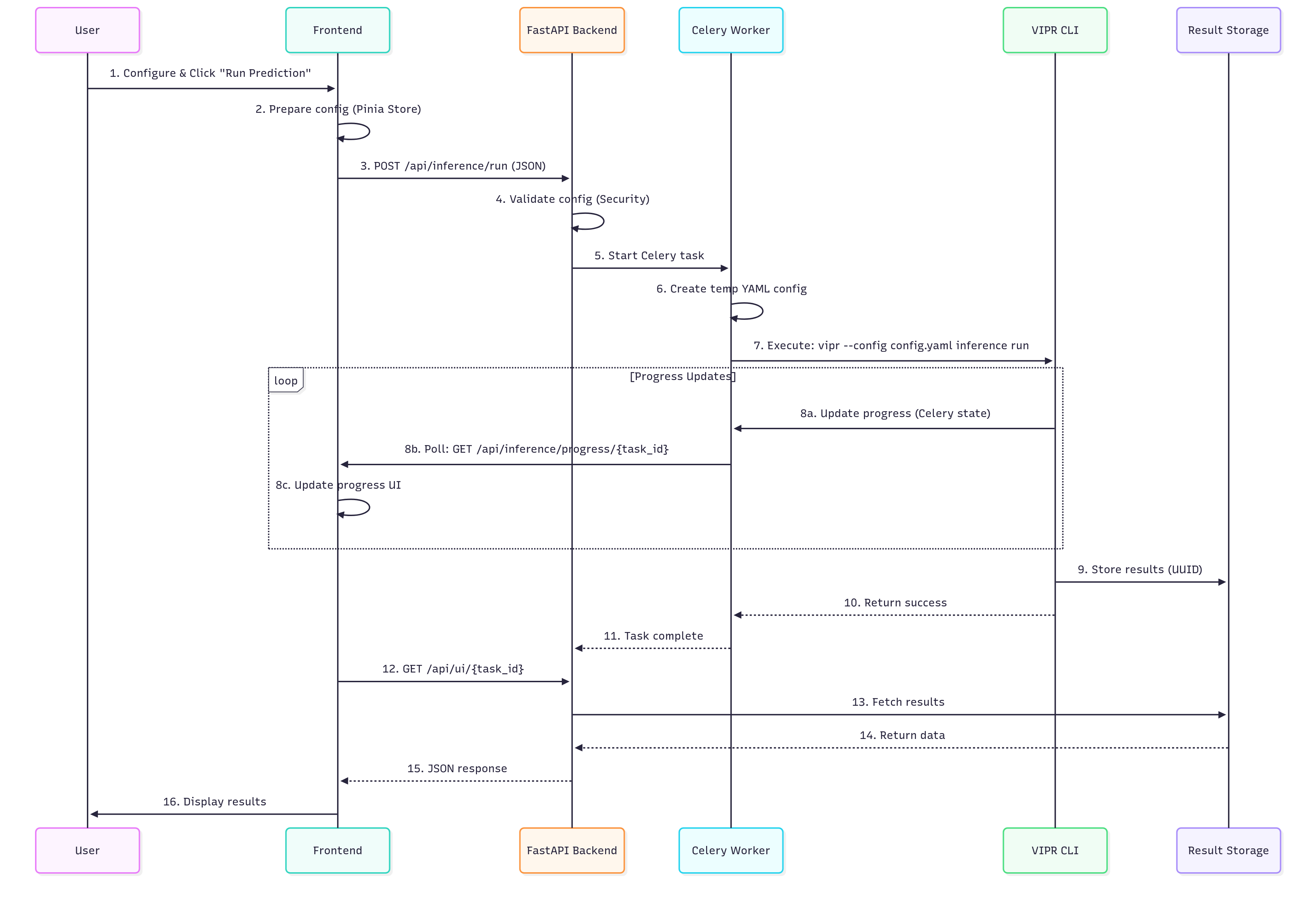
📊 View Mermaid Source Code (for editors with Mermaid support)
sequenceDiagram
    participant U as User
    participant F as Frontend
    participant API as FastAPI Backend
    participant C as Celery Worker
    participant CLI as VIPR CLI
    participant R as Result Storage

    U->>F: 1. Configure & Click "Run Prediction"
    F->>F: 2. Prepare config (Pinia Store)
    F->>API: 3. POST /api/inference/run (JSON)
    API->>API: 4. Validate config (Security)
    API->>C: 5. Start Celery task
    C->>C: 6. Create temp YAML config
    C->>CLI: 7. Execute: vipr --config config.yaml inference run

    loop Progress Updates
        CLI->>C: 8a. Update progress (Celery state)
        C->>F: 8b. Poll: GET /api/inference/progress/{task_id}
        F->>F: 8c. Update progress UI
    end

    CLI->>R: 9. Store results (UUID)
    CLI-->>C: 10. Return success
    C-->>API: 11. Task complete
    F->>API: 12. GET /api/ui/{task_id}
    API->>R: 13. Fetch results
    R-->>API: 14. Return data
    API-->>F: 15. JSON response
    F->>U: 16. Display results
Detailed Steps
1. Configuration (Frontend)
Location: vipr-frontend/layers/base/app/stores/pipelineConfigurationStore.ts
The user configures the inference pipeline through the Web UI:
// Store structure (vipr-frontend/layers/base/app/stores/pipelineConfigurationStore.ts)
const config = reactive<VIPRConfigWithStreaming>({
  config_name: 'Default config',
  vipr: {
    inference: {
      hooks: {},
      filters: {},
      load_data: {},
      load_model: {},
      prediction: {},
      preprocess: {},
      postprocess: {}
    },
    config_name: 'Default config'
  },
  streaming: {
    rabbitmq_config: DEFAULT_STREAMING_CONFIG.rabbitmq_config
  }
});
Key Components:
ExportImportConfig.vue: Load/save configurations
PipelineConfigurationStore: Centralized state management
UI Components: Step-by-step configuration interface
2. Trigger Inference (Frontend)
Location: vipr-frontend/layers/base/app/stores/inferenceStore.ts
User clicks “Run Prediction” button:
async function runInference() {
  isLoading.value = true;

  // 1. Call async prediction endpoint
  const response = await $inferenceApi.runInferenceAsyncApiInferenceRunPost(
    pipelineConfigStore.standardConfig
  );

  const taskId = response.data?.task_id;

  // 2. Start progress tracking
  const { startPolling } = useProgressTracking(taskId);
  await startPolling();

  // 3. Fetch results when complete
  const resultResponse = await $uiApi.getUIResult(taskId);
  displayData.value = resultResponse.data.data;
}
3. API Endpoint (Backend)
Location: vipr-api/vipr_api/web/routers/inference/tasks.py
Backend receives the inference request:
@router.post("/run")
async def run_inference_async(config: VIPRInference) -> dict[str, Any]:
    # 0. Check Celery backend availability (Redis or eager mode)
    can_execute, mode, error_msg = check_celery_backend()
    if not can_execute:
        raise HTTPException(status_code=503, detail=error_msg)

    # 1. Convert config to dict
    config_dict = config.model_dump(by_alias=True)

    # 2. Security validation — blocks malicious configs
    validation_result = validate_config_security(config_dict)
    if validation_result['errors']:
        raise HTTPException(status_code=400, detail=...)

    # 3. Start Celery background task
    task = run_vipr_inference.delay(config_dict, None)

    return {
        "task_id": task.id,
        "status": "started",
        "message": "VIPR inference task started successfully",
        "security_validated": True
    }
Key Features:
Backend Health Check: Verifies Redis/Celery availability before accepting request
Security Validation: Blocks malicious configs; warnings are logged but non-blocking
Async Execution: Non-blocking API response
Task ID: UUID for tracking and result retrieval
4. Celery Task (Background Processing)
Location: vipr-api/vipr_api/celery/src/tasks/inference.py
Celery worker executes the inference in a dedicated process:
@celery_app.task(bind=True, base=VIPRTask)
def run_vipr_inference(self, config_dict: dict[str, Any], result_id: str) -> dict[str, Any]:
    # 1. Report initial progress
    self.update_state(state=CeleryState.PROGRESS,
                      meta={'message': 'Starting VIPR inference...'})

    # 2. Use task_id as unified result identifier
    task_id = self.request.id

    # 3. Transform config (inject result_id, consumer_id)
    config_dict = prepare_vipr_config(config_dict, task_id)

    # 4. Write temporary YAML config file (VIPR runner requires file-based config)
    config_name = config_dict.get('vipr', {}).get('config_name', 'unnamed')
    temp_path = Path(config_dir) / f"{config_name}_config_{task_id}.yaml"
    with open(temp_path, 'w') as f:
        yaml.dump(config_dict, f)

    # 5. Execute VIPR CLI in worker main thread (signal handlers work here)
    runner.run_controller("inference", "run", str(temp_path), celery_task_ref=self)

    return {
        'status': 'SUCCESS',
        'result_id': task_id,
        'message': 'VIPR inference completed successfully'
    }
Why Celery?
Celery workers run in dedicated processes, solving several critical issues:
Process Isolation for Signal Handling
Problem: VIPR CLI (Cement framework) requires signal handlers (SIGINT, SIGTERM) for graceful shutdown and cleanup
Conflict: Uvicorn (FastAPI’s ASGI server) runs an asyncio event loop in the main thread, preventing proper signal handler registration by VIPR
Solution: Celery workers execute VIPR CLI in their own process with a dedicated main thread, allowing signal handlers to function correctly
Non-blocking API
FastAPI returns immediately with a task_id
Long-running inference doesn’t block the API server
Real-time Progress Updates
Workers report progress via Celery state mechanism
Frontend can poll for updates without blocking
Horizontal Scalability
Multiple Celery workers can process tasks in parallel
Each worker handles inference in its own isolated process
5. VIPR CLI Execution (Core)
Location: vipr-core/vipr/plugins/inference/inference.py
The CLI executes a 5-step inference workflow:
class Inference(BaseInference):
    def run(self, **config_overrides):
        # Global start hooks
        self._execute_start_hooks()

        # 1. Load Data → returns DataSet
        self.original_data = self.load_data_step.run(**self._ovr(config_overrides, "load_data"))

        # 2. Load Model
        self.model = self.load_model_step.run(**self._ovr(config_overrides, "load_model"))

        # 3. Step: Preprocess data (DataSet -> DataSet)
        # Note: normalization is handled as a filter inside this step
        #       (registered with a negative weight so it runs first)
        self.preprocessed_data = self.preprocess_step.run(
            self.original_data, **self._ovr(config_overrides, "preprocess")
        )

        # 4. Step: Perform prediction (DataSet -> results)
        predicted_data = self.prediction_step.run(
            self.preprocessed_data, **self._ovr(config_overrides, "prediction")
        )

        # 5. Postprocess
        self.result = self.postprocess_step.run(
            predicted_data, **self._ovr(config_overrides, "postprocess")
        )

        # Global completion hook
        self._execute_complete_hook()

        return self.result
Progress Updates:
Each step can report progress back to Celery using the celery_task_ref:
if hasattr(self.app, 'celery_task_ref') and self.app.celery_task_ref:
    self.app.celery_task_ref.update_state(
        state=CeleryState.PROGRESS,
        meta={
            'current_item': i + 1,
            'total_items': total,
            'message': f'Processing item {i+1}/{total}'
        }
    )
6. Result Storage (Backend)
Location: vipr-core/vipr/plugins/api/__init__.py
Results are automatically stored at the end of inference via a hook registered during plugin load:
def store_ui_data_directly(app, inference=None):
    # 1. Collect buffered log entries from VIPRLogHandler
    if hasattr(app.log, '_log_buffer'):
        app.datacollector.data.global_logs.extend(app.log._log_buffer)
        app.log._log_buffer.clear()

    # 2. Read result UUID from config
    result_id = app.config.get('vipr', 'result_id')

    # 3. Persist all collected UI data (tables, diagrams, images, logs)
    app.datacollector.save_result(result_id)

app.hook.register('INFERENCE_COMPLETE_HOOK', store_ui_data_directly, weight=200)
What Gets Stored:
data.pkl: Full UIData model (tables, diagrams, images, logs) serialised as pickle for UUID-based retrievalimages/*.svg: SVG image exportstables/*.csv/tables/*.txt: CSV and plain-text exports of tablesdiagrams/*.csv: CSV exports of diagram series data; diagram statistics as*_stats.txtscripts/: Auto-generated standalone Plotly scripts for each diagram
Retrieval:
GET /api/ui/result?id={result_id}
Design rationale: Because inference runs asynchronously in a Celery worker, the result cannot be returned in the HTTP response — the worker and the API communicate only via Redis task metadata (task_id, state). Redis is intentionally kept free of large payloads. The worker therefore writes the result directly to the filesystem. Once the task reaches SUCCESS, the frontend retrieves the result by ID through a dedicated API endpoint, fully decoupled from the original request.
7. Progress Tracking (Frontend)
Location: vipr-frontend/layers/base/app/composables/useProgressTracking.ts
The composable uses a recursive setTimeout loop (not setInterval) so the next poll only starts after the current one finishes. The interval adapts: 100 ms on success, 1000 ms after a network error.
export const useProgressTracking = (taskId: string) => {
  const progress = ref<ProgressData | null>(null)
  const isComplete = ref(false)
  const error = ref<string | null>(null)
  const isPolling = ref(false)

  const fetchProgress = async () => {
    const response = await $inferenceApi.getTaskProgressApiInferenceProgressTaskIdGet(taskId)
    const data = response.data

    if (data.status === CeleryState.Success) {
      progress.value = { ..., status: CeleryState.Success, percentage: 100 }
      isComplete.value = true
      stopPolling()
      return NORMAL_INTERVAL
    }
    // handle Progress / Failure / Pending states ...
    return NORMAL_INTERVAL  // or ERROR_INTERVAL on catch
  }

  const poll = async () => {
    if (!isPolling.value) return
    const nextInterval = await fetchProgress()
    if (!isPolling.value) return
    timeoutId = setTimeout(poll, nextInterval)
  }

  const startPolling = () => { isPolling.value = true; poll() }
  const stopPolling  = () => { clearTimeout(timeoutId); isPolling.value = false }

  return { progress, isComplete, error, isPolling, startPolling, stopPolling, cancelTask, reset }
}
Once isComplete flips to true, the Pinia inferenceStore (which owns the polling lifecycle) reacts via a Vue watch and fetches the actual result data:
// vipr-frontend/layers/base/app/stores/inferenceStore.ts
unwatch = watch(isComplete, (complete) => {
  if (complete) {
    resolve()  // breaks the await-Promise
  }
})

// After the promise resolves:
const resultResponse = await $uiApi.getUIResult(taskId)
if (resultResponse?.data?.data) {
  displayData.value = resultResponse.data.data
  resultsStore.resultId = taskId
  await resultsStore.loadResultConfig(taskId)  // fetch the original YAML config
}
8. Result Visualization (Frontend)
Location: vipr-frontend/layers/base/app/stores/resultsStore.ts
After the task reaches SUCCESS, the result is loaded by ID into the Pinia results store:
const displayData = ref<UIData | null>(null)

async function loadHistoryResult(id: string) {
  const response = await $uiApi.getUIResult(id)
  if (response.data?.data) {
    displayData.value = response.data.data as UIData
    resultId.value = id
    await loadResultConfig(id)  // also fetch the original YAML config
  }
}
Result Types:
Diagrams: Interactive line/scatter plots rendered with Plotly.js
Tables: Parameter tables and fit statistics
Images: SVG exports (e.g. SLD profiles)
Logs: Processing logs collected during inference
Configuration Formats
Web App Format (JSON)
{
  "config_name": "PTCDI-C3_XRR",
  "vipr": {
    "inference": {
      "load_data": {
        "handler": "csv_spectrareader",
        "parameters": {
          "data_path": "@vipr_reflectometry/examples/data/PTCDI-C3.txt",
          "column_mapping": {"q": 0, "I": 1}
        }
      },
      "load_model": {
        "handler": "reflectorch",
        "parameters": {
          "config_name": "b_mc_point_xray_conv_standard_L2_InputQ"
        }
      },
      "prediction": {
        "handler": "reflectorch_predictor",
        "parameters": {
          "calc_pred_curve": true,
          "calc_pred_sld_profile": true
        }
      }
    }
  },
  "streaming": {
    "rabbitmq_config": {
      "rabbitmq_url": "amqp://localhost:5672/"
    }
  }
}
CLI Format (YAML)
vipr:
  inference:
    load_data:
      handler: csv_spectrareader
      parameters:
        data_path: '@vipr_reflectometry/examples/data/PTCDI-C3.txt'
        column_mapping:
          q: 0
          I: 1
    load_model:
      handler: reflectorch
      parameters:
        config_name: b_mc_point_xray_conv_standard_L2_InputQ
    prediction:
      handler: reflectorch_predictor
      parameters:
        calc_pred_curve: true
        calc_pred_sld_profile: true
  result_id: PTCDI-C3_XRR_a1b2c3d4